
 All articles
We replaced a chat interview with a live sketchbook
How we built a character studio in Livewire 4, Alpine and hand-drawn SVG, why the sketch never waits on the server, and the guard rails around a painting that costs real money.
- The real studio, right in this article
- A free painted portrait of your kid, sent to your inbox
- No card, no password

FawnFox Fables makes picture books starring your kid. Which means the first thing we need is your kid: what they look like, closely enough that a painter could pick them out of a class photo.
For a long time we asked in a chat. "What does Mia look like?" Parents typed "brown hair, kind of wavy, big smile", and a model turned that into a profile. It worked, sort of. But "brown hair" covers half the playground, so the pictures drifted from page to page. Every answer was a model call, so every answer was a wait. And a dozen questions about someone's face, one text bubble at a time, felt less like making a character and more like filling in a form by text message.
So we threw out the interview and built a live sketchbook.
Make the look data
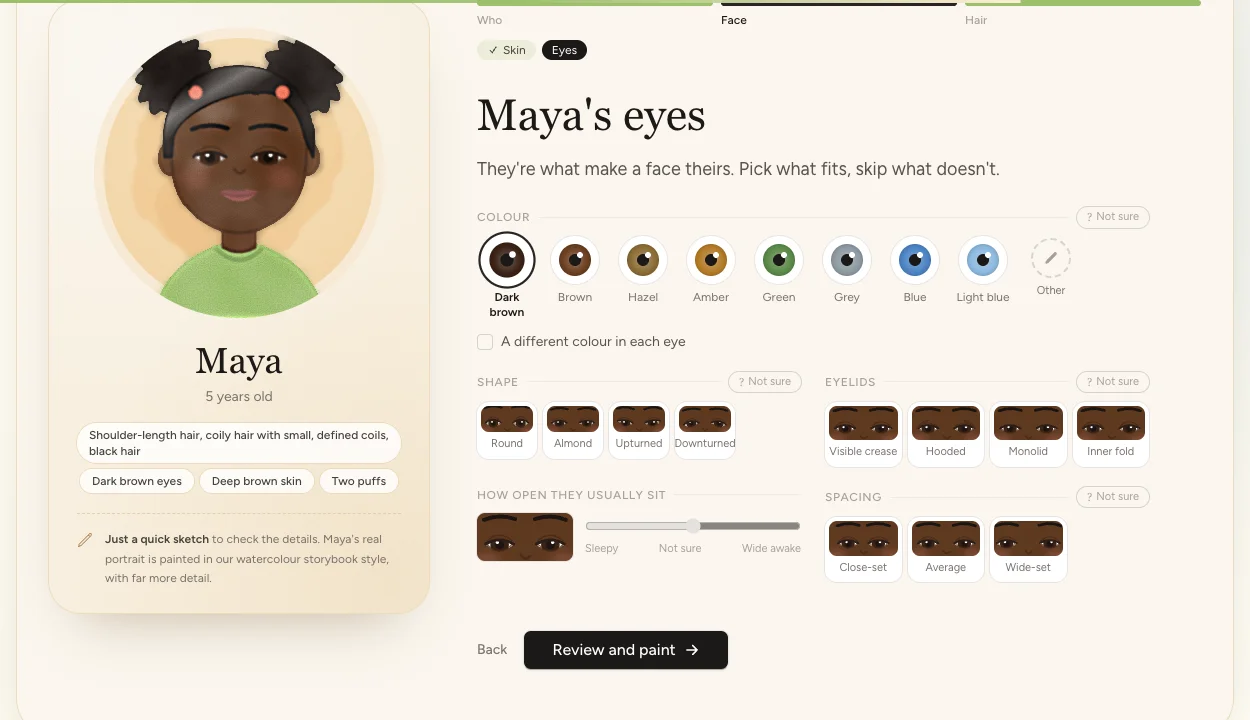
The first decision did most of the work: a look isn't a paragraph, it's data. Every choice in the studio is a backed enum, grouped by part of the face. There are 52 of them now, with 372 options between them, from skin tone to how a beard meets a moustache. Each one knows how to say itself, label itself and show itself.
enum SkinTone: string
{
case VERY_LIGHT = 'very_light';
// … seven more …
case VERY_DEEP = 'very_deep';
public function label(): string // what the painter is told
public function shortLabel(): string // what the tile says
public function swatch(): string // what the tile shows
}The picks land in one readonly DTO, CharacterLook. On the character's profile it's a JSON column behind a custom Eloquent cast, so $profile->look is always the DTO and never an array, and it's stored as the studio's own picks, so the studio can open it again exactly as it was left.
// app/Casts/CharacterLookCast.php: $profile->look is always a CharacterLook
public function get(Model $model, string $key, mixed $value, array $attributes): ?CharacterLook
{
$picks = $value === null ? null : json_decode((string) $value, true);
return is_array($picks) ? CharacterLook::fromInput($picks) : null;
}
public function set(Model $model, string $key, mixed $value, array $attributes): ?string
{
return $value instanceof CharacterLook
? (string) json_encode($value->toPicks())
: null;
}Two rules shaped the DTO more than anything else.
"Not sure" is an answer, not a blank. Every group has a "Not sure" next to it, and it's stored as such. A default would be a lie the painter believes: skip the eye colour, and you'd quietly get brown. Instead the painter is told, in so many words, what the family didn't say.
Their words win. Every group also has "Other", for the thing no option covers ("a cowlick that sticks straight up"). It's kept in the family's own words and wins over the pick.
// CharacterLook::toTraits(), the look as the painter reads it
'facial_hair' => $this->facialHair->describe(),
'other_details' => $this->notes,
'not_sure_about' => implode(', ', array_map(
fn (string $group): string => self::UNSURE_LABELS[$group],
$this->unsure,
)),Draw it in the browser
The second decision: the sketch never waits on the server. A tap changes the look, and the look is redrawn as SVG right there, about 3,100 lines of plain JavaScript for the face, the hair, the beard and the studio around them. Forty-odd hairstyles that combine (a bun and bangs and a headscarf), age-based proportions from newborn to great-grandparent, the lot.
It's deliberately a sketch, not a preview of the painting. It only has to answer one question: "is this them?" To make it feel like paper rather than a vector icon, the big one runs through an SVG filter stack: turbulence to wobble the line, pigment pooling at the edges, blotches, grain, and a little colour bleeding past the lines.
<filter id="studio-watercolour" color-interpolation-filters="sRGB">
<!-- a wobbly line -->
<feTurbulence type="fractalNoise" baseFrequency="0.035" result="warp" />
<feDisplacementMap in="SourceGraphic" in2="warp" scale="2" />
<!-- pigment that pools at the edges … -->
<feComposite in="ink" in2="soft" operator="arithmetic"
k2="1.6" k3="-0.6" result="pooled" />
<!-- … blotches in the wash, paper grain, a little bleed -->
</filter>Under the paper, it's one pure function and one Blade component. portrait(look, swatches) takes the picks and returns a plain object describing the drawing: the colours (skin mixed with its undertone, every edge shaded from the colour it outlines), and SVG path strings for the face, the layers of hair, the beard area by area, glasses, a hijab, birthmarks. Age reshapes all of it, from a newborn's big eyes and round face to a grandparent's.
// resources/js/character-portrait.js: picks in, a description of the drawing out
export function portrait(look, swatches) {
const age = ageShape(look.months); // babies: bigger eyes, rounder face, smaller body
const skin = mix(swatches.skin_tone[look.skin_tone], swatches.undertone[look.undertone], 0.16);
return {
sketch: { skin: !skin, hair: !hair, eyes: !eyes }, // unpicked parts stay dashed
skin, skinEdge: shade(skin, -0.22),
face: drawFace(look.face_shape, look.jaw, look.chin), // { w, d: 'M 100 44 C …' }
shape: drawHair(look), // back, curls and front layers, as path strings
beard: drawBeard(look), // area by area: moustache, chin, jawline…
worn: drawWorn(look.always_with), // glasses, hijab, hearing aids…
// … and about forty more
};
}The component is an <svg> of a few dozen layers, back to front: the back of a headscarf, the hair behind, shoulders, curls, the face, its shading, eyes, brows, nose and mouth, the hair in front, then what they wear. Every d, fill and transform is an Alpine binding to that object, so Alpine's reactivity does all the redrawing. Anything not picked yet is drawn dashed, which is how it stays a sketch until you choose.
The same component draws every option tile. A tile calls preview(): your picks so far, with that one option applied. So the forty-odd hairstyles aren't stock pictures, they're forty-odd small drawings of your kid with each style.
{{-- resources/views/components/characters/portrait.blade.php --}}
<svg viewBox="10 20 180 180"
x-data="{ p: {{ $source }} }"
x-effect="p = {{ $source }}"> {{-- drawn once per change --}}
<path :d="p.shape.back" :fill="`url(#${uid}-hair)`" :stroke="p.hairEdge" />
<g :fill="p.skin" :stroke="p.skinEdge" :stroke-dasharray="p.sketch.skin ? '4 4' : null">
<path :d="p.face.d" />
</g>
{{-- … eyes, brows, nose, mouth, the hair in front, then what they wear --}}
</svg>
{{-- The big sketch, and a tile showing one option on *their* face --}}
<x-characters.portrait source="portrait" painterly />
<x-characters.portrait source="preview({ hair_style: ['puffs'] })" frame="head" />Nothing leaves the browser until the parent asks for a painting. The picks are kept in localStorage as they go, so a closed tab or a phone that dropped the page doesn't lose anything.
Here it is. It's the real studio, in the short form we put in articles, with the data it builds showing under the sketch.
Now you try!
The real studio, in its quick version. Pick a name and tap around: the panel under the sketch is exactly what the server gets when you paint.
Welcome back! We kept your picks for .
Who are we drawing?
Start with the name they'll see on every page. Nicknames are perfect.
They're…
A teddy bear, a robot, a dragon, a talking teapot: anything that isn't a person or an animal.
Pronouns · optional
How old is ? How old does seem?
So the pictures and the words fit them just right.
Years old
Babies
Older
Exactly how old? (optional)
What is ?
Tell us what they are and how they look, and we'll draw them just right.
How should we draw them?
Their colours
's skin
Pick whatever's closest. Not sure? Skip it.
Have a photo of ? We can fill these in for you.
Looking closely…
Filled in from your photo. Change anything that's not quite right.
Totally optional. We look once to pick the closest matches, then delete it.
A hint: veins look blue or purple on cool skin and green on warm, or think of whether silver or gold suits them best. Not sure? Skip it.
's face
The shape of it, from the cheeks down to the chin.
's nose and ears
Small things that make a big difference to a likeness.
's eyes
They're what make a face theirs. Pick what fits, skip what doesn't.
The colour above is the eye on the left as you look at them. The other eye:
's eyebrows
They do a lot of the talking. Pick what's closest.
Colour
's lips
Their shape and colour, and how wide the mouth is.
's smile
Every smile is different. Pick what's closest.
's facial hair
Start from the closest, then fine-tune any part. None at all is an answer too.
How the moustache is worn
Does the moustache meet the beard?
How high it comes up the cheeks
How wide on the chin
The bottom of the beard
Down the neck
How it grows: straight, wavy, curly…
Colour
Going grey?
How thickly it grows
Anything in it, or done to it
And 's hair?
Dyed and bright
The second colour
How does wear it?
The way you'd see them on an ordinary day.
You picked a bald head, so there's nothing to style. Anything in the Body step (like a hat they always wear) still shows.
Pick as many as fit, from anywhere in the list.
Short cuts
Worn down
Tied up
Braids, twists and locs
, head to toe
The stories show them from head to toe, so a little about their build helps.
Always with them
Anything they wear or use every day, so they're drawn the way you know them.
On their head or face
Faith and culture
Getting around
Health
For little ones
The little things
The bits that make it look like . Pick any that fit.
So they're drawn as themselves, gently and accurately.
Lines and marks
Creases, freckly patches, birthmarks and scars: what makes a face 's own.
Pick one, then tap where it is on 's sketch. Now tap the sketch where it goes. Tap a mark to remove it.
Save 's new look?
What's changed
Nothing about the look has changed.
We'll redraw 's character sheet and portrait from the new look. Stories already made keep their pictures.
Paint for real?
Tell us where to keep , and we'll paint their portrait in our storybook style while you watch.
We'll keep in an account with this email. There's no password for now: we'll email you a link to set one. See our privacy policy.
Ready to paint ?
We'll paint 's portrait from everything you've picked. It's worth one more look at the sketch first.
If something isn't quite right, you can change the look and repaint . After that, this portrait is the one we'll use.
Repaint ?
What's changed
Nothing's changed yet, so there's nothing to repaint.
Subscribers get an extra repaint.
Painting …
Every pick you made is going into it. It takes about half a minute.
is saved
The portrait will be on 's page as soon as it's painted.
Meet !
Painted from your picks.
Now, who is ?
The look is done. Now tell us what makes , .
Load it only where it's needed
The studio is a Livewire 4 single-file page component with Alpine doing the drawing. Its JavaScript and CSS are their own Vite entries, pushed into the head by the studio page alone, so the rest of the app doesn't carry the drawing code.
That raised one question: does wire:navigate run the new head scripts before Alpine starts on the new page? It does: Livewire waits for new head scripts to load before it initialises the page. The entry just has to cope with both orders.
// resources/js/studio.js: pushed into the head by the studio page only
import characterStudio from './character-studio';
const register = () => window.Alpine.data('characterStudio', characterStudio);
// A full page load runs this before Alpine starts; arriving by a
// wire:navigate link runs it with Alpine already going.
if (window.Alpine) {
register();
} else {
document.addEventListener('alpine:init', register);
}The bug the fast track hid
While writing this article, we found the studio starting over at the very moment it began painting. The chat would open, but the painting animation and the reveal never showed.
The cause: Alpine re-initialises a component whose x-data attribute changes, and Livewire's re-render changed it. The studio's setup included the typed name. Finishing the studio saves the name on the server, so the next render had a different x-data, and Alpine started over with a fresh studio.
Our Christmas fast track hid it. There, the name came from the campaign form, so it was already in the setup, and finishing didn't change it.
{{-- Before: begin() sets $characterName, so the re-render changes
x-data, and Alpine starts the whole studio over --}}
'initialName' => $characterName,
{{-- After: only what was known when the page opened --}}
'initialName' => $this->changing?->name
?? BriefText::name($this->campaignBrief['kid_name'] ?? ''),The test now compares the studio's x-data before and after the finish. If you pass server state into x-data, check it can't change under you.
Reading a photo, then forgetting it
Tapping through every option is the slow way. The studio has a shortcut, even in the quick version above: share a photo, and the picks fill themselves in. For visitors without an account, it's a few reads an hour per IP address, in the ledger as a visitor's. This is the one place a vision model touches the look, and we kept it on a short leash.
The model doesn't describe the photo in its own words. It gets a structured-output schema built from the same enums the studio offers, so every answer is one of our options or null. A pick it can't see stays empty rather than guessed. What comes back goes through CharacterLook::fromInput(), like anything a parent tapped, and lands on the sketch for the parent to check and fix.
// Every answer must be one of the studio's own options, or null
$choice = fn (string $name, string $about, array $cases): EnumSchema => new EnumSchema(
$name,
$about,
array_map(fn (BackedEnum $case): string => (string) $case->value, $cases),
nullable: true,
);
return new ObjectSchema('look', 'What the person in the photo looks like', [
$choice('skin_tone', 'Closest skin tone', SkinTone::cases()),
$choice('eye_color', 'Closest eye colour (their right eye, on the left of the photo)', EyeColor::cases()),
$choice('hair_texture', 'Hair texture', HairTexture::cases()),
// … one for every group in the studio
]);Then the photo goes. It's read once, never stored, and deleted in a finally, so a failed read doesn't leave it behind. That includes the little JSON file Livewire keeps about every temporary upload.
// The studio page, straight after the read, whatever happened
try {
return resolve(ReadLookFromPhoto::class)->handle(/* … */)->toPicks();
} finally {
$this->discardPhoto();
}
private function discardPhoto(): void
{
if ($this->photo !== null) {
$this->photo->delete();
// Livewire keeps a note of the original filename too
FileUploadConfiguration::storage()->delete(
FileUploadConfiguration::path($this->photo->getFilename().'.json'),
);
}
$this->photo = null;
}Here's the whole trip with a made-up grandma (we made her photo, so it's nobody's family photo):
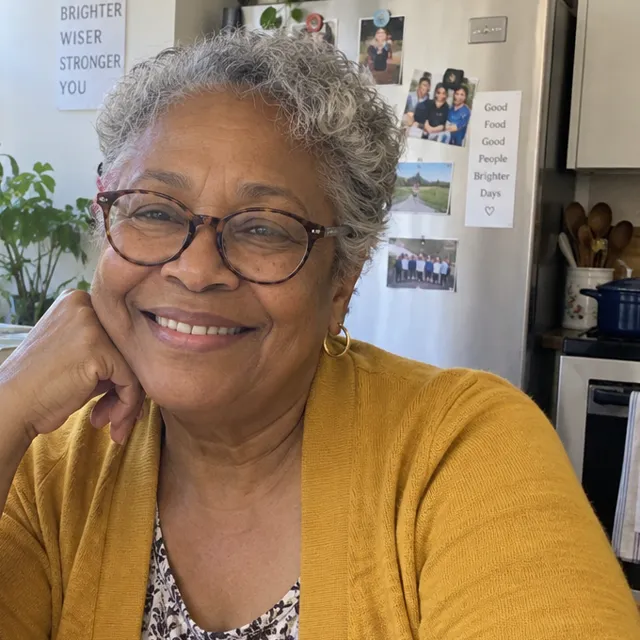
A photo HoverTap to compare
- Brown skin
- Grey hair
- Loose, springy curls
- Short hair
- Dark brown eyes
- Glasses
- Dimples
- Rosy cheeks
- Earrings
- A smile showing their top teeth
- Eyes that crinkle almost shut when they smile
- Laugh lines from the nose to the corners of the mouth
- +17 more
What the studio read
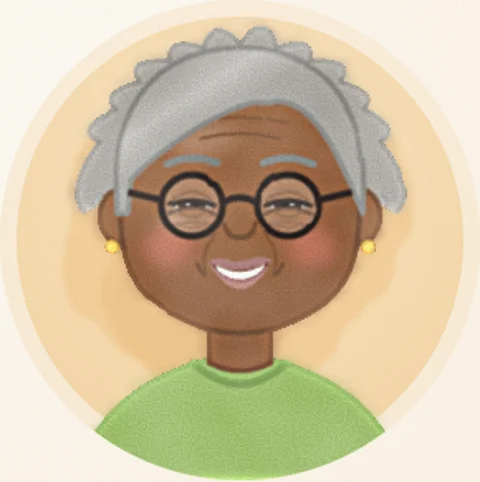
The sketch Painting… Move across it
- Attach
- Upload
- Read
- Delete the photo
- Sketch
- Paint
Why the painter never sees the photo
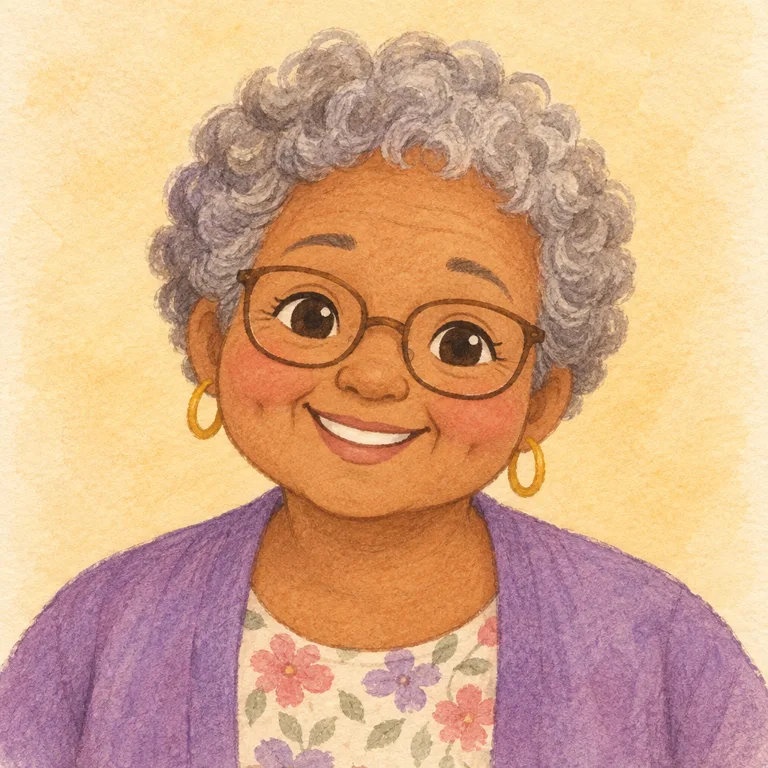
The obvious next move is to hand the photo to the painter as a reference image. Better likeness, surely? We tried it, along with handing it the sketch. Here's Nana Rose three ways, with the same prompt every time. The two with a reference image just add "use the attached image as a reference for this person's likeness".
What we ship
Picks only
The house style holds: big simple eyes, soft shapes, our watercolour.
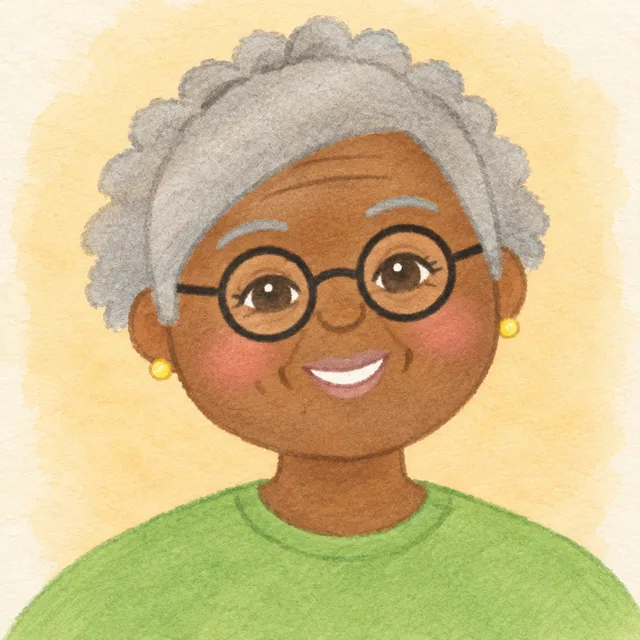
Picks + the sketch
It copies the sketch: the flat green T-shirt, the thin round frames, the helmet of hair.
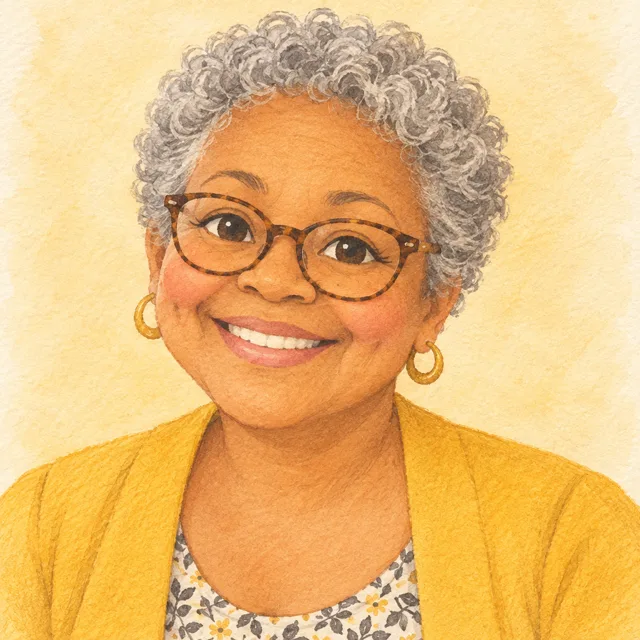
Picks + the photo
It drifts toward a real face, and copies her cardigan right out of the photo.
The reference image is louder than the prompt. The sketch pulls the painting toward the sketch, and the photo pulls it toward a photo. Our house style says round, simple storybook faces, and every reference argues with it.
And there's a reason that matters more than looks. To paint with the photo, we'd have to keep it, for this portrait and for every character sheet and story page after it. We'd rather not hold photos of people's kids at all. So the photo fills in the picks, gets deleted, and the painter only ever sees words.
Paint carefully
The sketch is free. The painting isn't: each portrait is one paid image call, a couple of cents. That's nothing once, and a real bill if someone finds a way to do it a hundred thousand times. So the painting has guard rails:
- One at a time, a few an hour. A cache lock means a double click can't paint twice. A rate limit caps any character at six paintings an hour.
- One repaint. If something's off, you change the look and paint again, once (twice for subscribers).
- Honest failures. A failed painting is sorted into three kinds: refused, unreachable, or our mistake. Only a refusal of the family's own words counts against them. The others are forgiven, twice per character, so nobody can retry forever.
- Never retry a refusal. The same request would only be refused again, and each try is paid. It still throws, so it's still reported.
- Every attempt in the ledger. Every image call writes a row to our cost ledger, painted or not, and every failure pings our Slack.
$failure = $this->markFailed($variant, $exception);
// A refusal would only be refused again, and each try is paid
$refused = $failure === IllustrationFailure::BLOCKED;
event(new IllustrationFailed(
$illustration,
final: $refused || ! $this->willRetry,
));
// Failed, not retried; the throw still reports it
if ($refused && $this->job instanceof JobDecorator) {
$this->job->fail($exception);
}
throw $exception;The newest rail is for visitors. The studio in this article paints for anyone who gives us a first name and an email, with no password and no sign-up form. That's a whole account, signed in on the spot, with the painting emailed to them along with a link to set a password. Clicking that link verifies the address too. To keep that from becoming a free painting machine, the email's domain has to have a mail server, a hidden field catches bots, one IP address gets a few a day, and there's a ceiling for everyone that reports itself when it's hit.
// AdmitStudioGuest: a few per IP address a day, and a ceiling for
// everyone (both set in our admin) that tells us when it's reached
if (RateLimiter::tooManyAttempts($everyone, $this->settings->studioGuestsPerDay())) {
if (Cache::add("{$everyone}:reported", true, 86400)) {
report(new RuntimeException(
'The studio\'s light sign-ups hit the daily ceiling',
));
}
return self::BUSY;
}What it's built with
Laravel 12, Livewire 4 single-file components, Alpine, Flux, Tailwind 4 and Pest 4, with Horizon running the paintings. No front-end framework and no canvas library: the drawing is SVG strings built by hand.
If you'd rather see the parents' side of it, there's a shorter, friendlier version of this article. And if you have a kid, a niece, a grandparent or a dog, draw them. That's the best review this thing can get.